Herdr · New mod
Find and Install AI Skills Without Leaving Herdr
The skills-hub mod for Herdr lets you search skills-hub.ai, install a skill into Claude Code, Codex and Cursor in one click and keep every tool in sync.
You run three agents in Herdr. Claude Code in one pane, Codex in another, Cursor open on the side. Then you find a great skill and realize you have to install it three times, in three different folders.
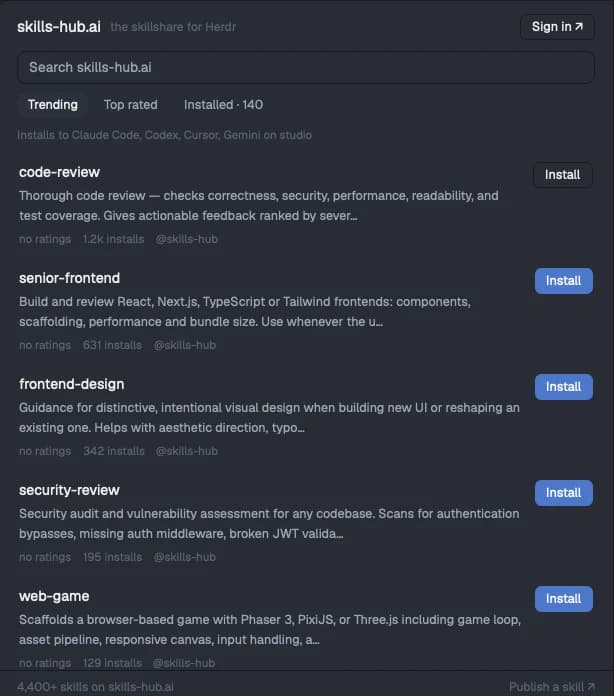
The new skills-hub mod for Herdr fixes that. It puts skills-hub.ai in a Herdr panel, so you can find a skill and install it into every AI tool on your machine with one click. No browser tab. No account.
TL;DR
- The skills-hub mod adds a panel to Herdr where you search and browse skills-hub.ai.
- Trending and Top rated lists show you what other developers actually use.
- One click installs a skill into Claude Code, Codex, Cursor and any other AI tool it finds on your machine.
- The Installed tab re-syncs your skills across tools. No sign in needed.
This is for developers who run more than one coding agent in Herdr and want the same good skills in all of them.
1. Install the mod
Herdr mods are plain folders under ~/.config/herdr-app/mods/. The easiest way to add one is to ask the agent you already have running in Herdr. It reads the mod's recipe, tells you what it touches and copies the folder in for you.
Add the Herdr mod at https://github.com/tinh2/herdr-skills-hubPrefer to do it by hand? Clone it and copy the mod folder:
git clone https://github.com/tinh2/herdr-skills-hub /tmp/herdr-skills-hub
cp -R /tmp/herdr-skills-hub/mods/skills-hub ~/.config/herdr-app/mods/
herdr-app check ~/.config/herdr-app/mods/skills-hub
herdr-app check loads the mod once and reports anything wrong. If it prints nothing scary, you're done. Open the command palette and pick skills-hub: browse and install skills.
2. Find a skill
The panel opens on Trending: skills getting installs right now. Switch to Top rated when you want the ones that held up over time. Or just type in the search box.
Here's the thing most people miss. Searching for a tool name ("postgres") gets you a pile of results. Searching for the job you want done ("review a migration before deploy") gets you the skill you actually need.
3. Install it everywhere
Hit Install on a skill. The mod finds every AI coding tool on your machine (Claude Code, Codex, Cursor, Gemini, Windsurf, OpenCode, Cline and more) and drops the skill into each one's skills folder. The line under the tabs tells you exactly which tools it found.
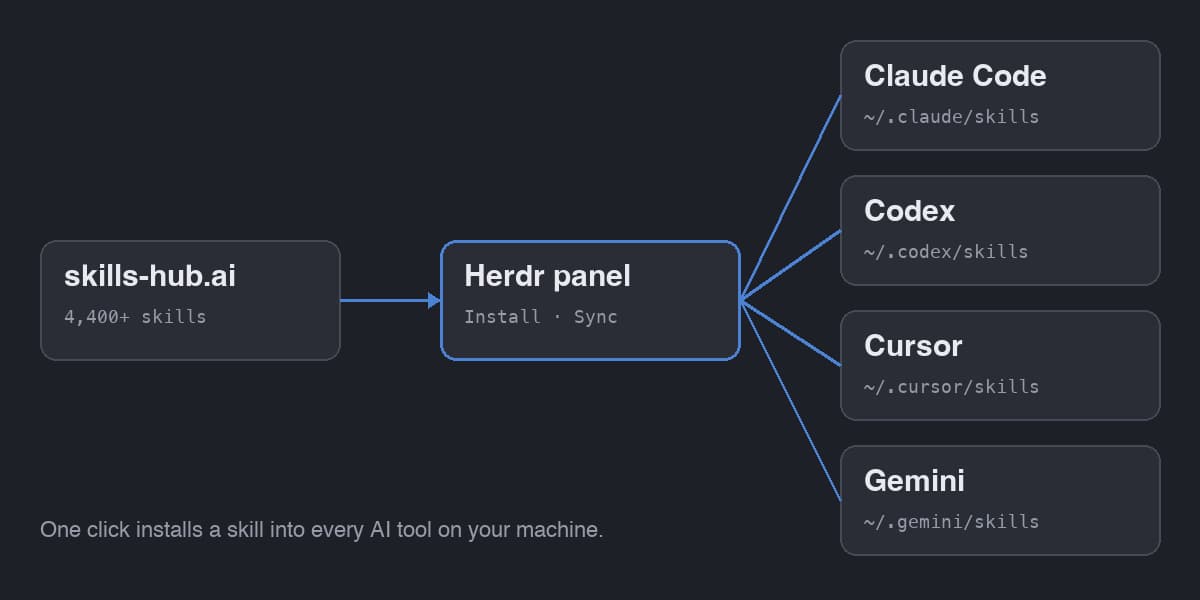
Your next agent session picks it up. In Claude Code you can check with /skills. In Codex, ask it to list its skills.
This is the same install the skills-hub CLI does. If you ever want it from a terminal instead, copy this:
npx @skills-hub-ai/cli install <skill-name>4. Keep your tools in sync
Install a new agent next month and it starts with no skills. Update a skill in Claude Code and Codex keeps the old version. That drift is what the Installed tab is for.
It lists every skill you've installed and how many of your tools have it. Hit Sync to all tools and it copies the newest version of each skill to every tool that's missing it or behind. When a newer version is on skills-hub.ai, the skill shows an Update button. No account, no cloud copy. It all happens on your machine.
skillshare or skills-hub?
If you browse the Herdr gallery you'll see skillshare by runkids near the top. It's the most starred entry for a reason: it syncs skills, agents, MCP config and plugins across your AI CLIs with one command and it's good at team sharing.
So which one? Short version: skillshare syncs the skills you already have. skills-hub helps you find better ones, then syncs them everywhere.
- Pick skillshare if you write your own skills and want one source of truth shared with a team.
- Pick skills-hub if you want to discover rated skills from a public catalog and install them in one click.
- Use both if you do both. They write to the same skills folders, so they get along fine.
Common mistakes
- Installing ten skills at once. Every skill description costs context. Start with two or three you'll use this week.
- Expecting a running agent to notice. Most tools read skills at session start. Restart the agent after installing.
- Editing a skill without bumping its version. Sync spreads the highest version. Bump
versionin the SKILL.md frontmatter, then hit Sync to all tools. - Skipping the description. A skill only fires when its description matches what you ask for. Read it so you know how to trigger it.
What you just set up
You now have skills-hub.ai inside Herdr. You can find a skill by the job it does, install it into every agent on your machine with one click and keep those agents in sync from the Installed tab.
Next steps:
- Browse the full skills-hub.ai catalog for ideas.
- Write your own with the SKILL.md tutorial and publish it so it shows up in the Herdr panel too.
- Star the herdr-skills-hub repo to get updates.
Open Herdr, add the mod and install one skill today. Your agents will all have it before your coffee's cold.
Written by
Skills-Hub Team
Skills-Hub is the open registry for AI coding skills, with SKILL.md files synced daily from Anthropic, Google, Microsoft, and 90+ official sources. Free + MIT.